Corel AfterShot pro: Reviews, pricing and features
It is a complete photo retouching tool. Corel AfterShot Pro makes it easy for you to handle RAW photos. It differs from traditional tools in a number of ways. In addition to the basic tools, it also has modules for managing metadata, shot organization functions, etc. It also gives you access to various applied effects. This software offers an output tab that allows you to select the destination of the images: gallery, format, printing, etc. What are the main advantages of this tool?
 It is a graphic design tool in SaaS mode. It is especially dedicated to professionals as well as companies. This software package is especially recommended for sectors or creative professions. It is SMEs that often use this tool. This cloud software is very popular with many IT professionals and different companies. It is requested by companies in France and around the world.
 For the launch of this software package, Corel is building on the foundation of Bibble Labs’ technology. This software is specialized in digital photo processing. By launching its software, Corel launches a frontal attack against the famous Adobe Photoshop Lightroom CC. Thanks to this tool, it is now easy to process files by batch. Does Corel AfterShop pro live up to its promises?
Even though it’s dedicated to professionals, it still has a user-friendly side to it. It’s fluid and easy to use. You should know that this tool is organized around 3 panels :
● The panel on the left: it is mainly intended for the management of catalogs. It facilitates the search through EXIF data. It also allows you to easily import photos and manage their output formats.
● The display of photos: for this, you will have to refer to the central frame. The user will be free to put one or more photos there. It is a very practical tool, because it allows both displaying the original photo and the retouching in progress.
● The processing panel.
At first glance, the effects and (non-destructive) treatments offered by this software seem a little light and simplistic. This printing stops only at the first tab. The first panel is only used to make the first adjustments. It will not allow you to add subtlety to the photo retouching.
Once the first adjustments have been made, it will be necessary to go to the other tabs (color, tone and detail). The user will even have access to noise removal functions such as « Ninja Noise ». This feature offers excellent quality results. When it comes to optical corrections, professionals can easily find tools that meet their expectations. They will have access to a base provided as well as the possibility of manual configuration.
It should be noted that this tool allows the user to use adjustment layers for cleaning and cloning. This is a very practical tool especially for those who want to obtain authentic results.
Corel AfterShop is perfectly suited for multi-core processes. This feature gives it a rather interesting performance especially when processing several photos.
For the launch of this software package, Corel is building on the foundation of Bibble Labs’ technology. This software is specialized in digital photo processing. By launching its software, Corel launches a frontal attack against the famous Adobe Photoshop Lightroom CC. Thanks to this tool, it is now easy to process files by batch. Does Corel AfterShop pro live up to its promises?
Even though it’s dedicated to professionals, it still has a user-friendly side to it. It’s fluid and easy to use. You should know that this tool is organized around 3 panels :
● The panel on the left: it is mainly intended for the management of catalogs. It facilitates the search through EXIF data. It also allows you to easily import photos and manage their output formats.
● The display of photos: for this, you will have to refer to the central frame. The user will be free to put one or more photos there. It is a very practical tool, because it allows both displaying the original photo and the retouching in progress.
● The processing panel.
At first glance, the effects and (non-destructive) treatments offered by this software seem a little light and simplistic. This printing stops only at the first tab. The first panel is only used to make the first adjustments. It will not allow you to add subtlety to the photo retouching.
Once the first adjustments have been made, it will be necessary to go to the other tabs (color, tone and detail). The user will even have access to noise removal functions such as « Ninja Noise ». This feature offers excellent quality results. When it comes to optical corrections, professionals can easily find tools that meet their expectations. They will have access to a base provided as well as the possibility of manual configuration.
It should be noted that this tool allows the user to use adjustment layers for cleaning and cloning. This is a very practical tool especially for those who want to obtain authentic results.
Corel AfterShop is perfectly suited for multi-core processes. This feature gives it a rather interesting performance especially when processing several photos.
The main features of Corel AfterShot pro
 It is a graphic design tool in SaaS mode. It is especially dedicated to professionals as well as companies. This software package is especially recommended for sectors or creative professions. It is SMEs that often use this tool. This cloud software is very popular with many IT professionals and different companies. It is requested by companies in France and around the world.
– Corel AfterShot pro: the characteristics of this software
It is a digital photography workflow software. It stands out for its speed and flexibility. This tool allows : ● To manage photos; ● To carry out an advanced non-destructive editing; ● To make a complete RAW processing; It is a product of Corel Software. By downloading this software on its official website, you will have : ● Access to various product information; ● A software download and a free trial; ● Access to tutorial resources.– Integration with extensions, APIs and third party software
The advantage with this software easily adapts to other applications, plugins, modules and APIs (Application Programming Interface). It is easy to synchronize it with other computer data.– What about data compatibility and localization?
With this software, the user does not face any compatibility problems. It is compatible with several operating systems and devices. It can be used on Linux, Mac OC, etc. It is important to know that this software is subject to updates. Thus, it benefits from both new features and security patches. It should be noted that the data concerning this enterprise software package is stored in the United States.Corel AfterShot pro: software that defies the most famous photo processing tools
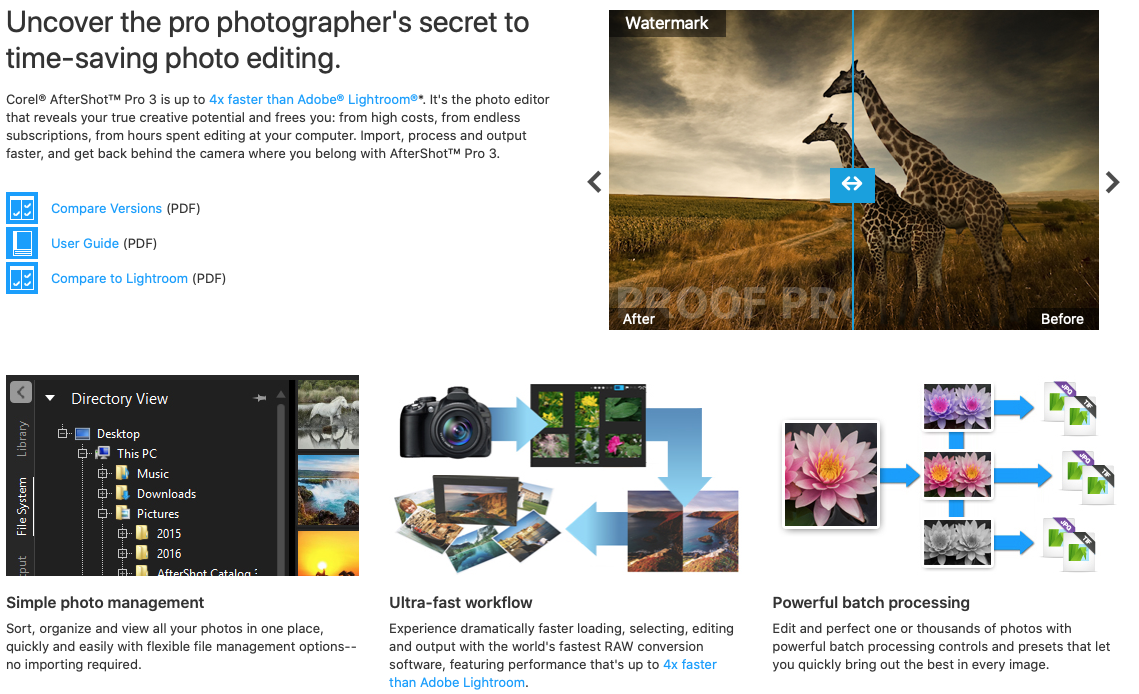 For the launch of this software package, Corel is building on the foundation of Bibble Labs’ technology. This software is specialized in digital photo processing. By launching its software, Corel launches a frontal attack against the famous Adobe Photoshop Lightroom CC. Thanks to this tool, it is now easy to process files by batch. Does Corel AfterShop pro live up to its promises?
Even though it’s dedicated to professionals, it still has a user-friendly side to it. It’s fluid and easy to use. You should know that this tool is organized around 3 panels :
● The panel on the left: it is mainly intended for the management of catalogs. It facilitates the search through EXIF data. It also allows you to easily import photos and manage their output formats.
● The display of photos: for this, you will have to refer to the central frame. The user will be free to put one or more photos there. It is a very practical tool, because it allows both displaying the original photo and the retouching in progress.
● The processing panel.
At first glance, the effects and (non-destructive) treatments offered by this software seem a little light and simplistic. This printing stops only at the first tab. The first panel is only used to make the first adjustments. It will not allow you to add subtlety to the photo retouching.
Once the first adjustments have been made, it will be necessary to go to the other tabs (color, tone and detail). The user will even have access to noise removal functions such as « Ninja Noise ». This feature offers excellent quality results. When it comes to optical corrections, professionals can easily find tools that meet their expectations. They will have access to a base provided as well as the possibility of manual configuration.
It should be noted that this tool allows the user to use adjustment layers for cleaning and cloning. This is a very practical tool especially for those who want to obtain authentic results.
Corel AfterShop is perfectly suited for multi-core processes. This feature gives it a rather interesting performance especially when processing several photos.
For the launch of this software package, Corel is building on the foundation of Bibble Labs’ technology. This software is specialized in digital photo processing. By launching its software, Corel launches a frontal attack against the famous Adobe Photoshop Lightroom CC. Thanks to this tool, it is now easy to process files by batch. Does Corel AfterShop pro live up to its promises?
Even though it’s dedicated to professionals, it still has a user-friendly side to it. It’s fluid and easy to use. You should know that this tool is organized around 3 panels :
● The panel on the left: it is mainly intended for the management of catalogs. It facilitates the search through EXIF data. It also allows you to easily import photos and manage their output formats.
● The display of photos: for this, you will have to refer to the central frame. The user will be free to put one or more photos there. It is a very practical tool, because it allows both displaying the original photo and the retouching in progress.
● The processing panel.
At first glance, the effects and (non-destructive) treatments offered by this software seem a little light and simplistic. This printing stops only at the first tab. The first panel is only used to make the first adjustments. It will not allow you to add subtlety to the photo retouching.
Once the first adjustments have been made, it will be necessary to go to the other tabs (color, tone and detail). The user will even have access to noise removal functions such as « Ninja Noise ». This feature offers excellent quality results. When it comes to optical corrections, professionals can easily find tools that meet their expectations. They will have access to a base provided as well as the possibility of manual configuration.
It should be noted that this tool allows the user to use adjustment layers for cleaning and cloning. This is a very practical tool especially for those who want to obtain authentic results.
Corel AfterShop is perfectly suited for multi-core processes. This feature gives it a rather interesting performance especially when processing several photos.